XLStoEXE
XCell Compiler offers very easy and hassle free XLStoEXE
conversion.
You can compile Excel workbook (XLS file) into EXE application
with securely
hidden formulas
in binary format and protected VBA code. With registration/license
management feature you can protect your compiled Excel workbook from
illegal copying from one computer to another by using hardware locking
mechanism. It offers you to add your own splash, icon, end user license
agreement (EULA) and much more...
Please try the XCell Compiler Free
Trial version which
is completely functional for workbook formula protection and calculation.
XCell Compiler main features:
- Securely
hide formulas by converting them into binary format. Without
this feature any kind of Excel file copy protection is useless.
- Convert
Excel workbook (XLS file) into an application (EXE File,
which requires Excel to run). You do not need to be a programmer to use
the product.
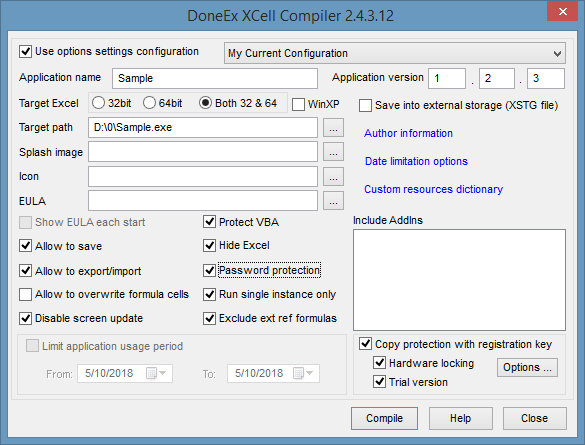
- VBA code protection.
- Create
registration key/license based application. Prevent illegal
copying from one computer to another.
- Hardware
locking! Allow your XLStoEXE converted applicaiton to work on
target computer only.
- Royalty free distribution of your XLStoEXE converted EXE,
which doesn’t require any preinstalled Run-Time libraries.
- The original Excel workbook stays without any changes after
compilation.
- Restrict the time period of usage for your XLStoEXE
converted Excel workbook.
- License expiration warning. Add your own customized
expiration message.
- Add your own End User License Agreement (EULA) information.
The compiled Excel workbook will not be started until the end user
accepts the EULA.
- Save changed data directly into compiled EXE.
- Create
Trial/Demo of compiled Excel workbook limited by amount of
days and annoying window.
- Hide
Microsoft Excel on start.
- Compiled Excel
workbook copy protection with Matrix
Dongle.
- Export/Import changed data from/to compiled EXE; Import
data into original Excel workbook.
- Add your own application name, version and copyright
information.
- You can add your own splash screen, while compiling. This
will give you a chance to advertise your own company name.
- Install your Add-ins (XLA files) on your customer's
computer.
- Restrict the access only to authorized individuals, and
limits users' activities to the minimum required, for business purposes.
- Eliminates the chances of exposure of corporate secrets,
breaches in customer confidentiality, and the disruption of business
activities.
- Prevents information from being altered in an unauthorized
manner.